Showing posts with label Sky Rooting. Show all posts

| How To Root | The Easy Way to Root Any Android Device Without PC


|How to Root | Easy Way to Root Any Android Device Without PC

Hi Guy’s in This Video I Teach You How to Root Your Android Smart Phone
 | LG | - | Samsung |- | Sky Vega | - | HTC |
And Others Famous Brands
Note: -
if you are using Android 4.1 Jellybean OS On your Smart Phone Then Your Phone Rooted Via
| FramaRoot Apk |
If you are using Android 4.4 Kit-Kat OS On Your Smart Phone, Then Your Phone Rooted Via 
| Towel Root Apk |
|How to Root Via Above Mention Software |
In This Video I’m using Towel Root Because My Phone Android Version 4.4 KK
1  ➤ Download Towel-Root Apk and Then Copy In-to Phone Memory & Install it.   
   |Link Added in Description |
    ➤ Now Connect Your Phone with Internet Connection Wifi or 3G Any
    ➤Now Open Towel-Root and Click On make it Ra1n Button |When Appear Thank You Status Then       Exit Towel-Root
        Now Go-to Play Store and Download SuperSu App or Download from Link in Description      
    When SuperSu Successfully Download from Play Store Then Open It and Click ON Update Birney    and Wait
    ➤After successfully updated Click On Reboot and Enjoy. Now Your Phone Is Rooted. J


Don’t Forget to Subscribe Our Channel

Sky Vega A910 S | K Stuck On Teamwin Recovery | Fixed | Updated 17/11/2016


Sky Vega IM-A910S & K Stuck On Teamwin recovery After Receiving OTA Update
Now Fixed This Issue Without Whole Device Flashing
Just Follow Below Instructions..

After Download Above File Extract It Via Winrar. Then Follow Steps Below,
➤ Download And Install Sky Driver | PVEGA & Motrola Fastboot | 
➤ After Installing Driver Putt Your Phone On Fast-boot Mode Via Pressing Theses Buttons
                                        | Volume Up +  Volume Down + Power|

➤ When You Press Above Button At Same Time For 5 Second A Menu Appear. Then release The Buttons And Use Volume Up And Down Buttons For Move Up And Down And Power Button For Select. Now Select Fast-boot Mode From This Menu.

➤ After Selecting Fast-boot Mode Attached Phone With PC Via Data Cables.
➤ Now Open Stock recovery Extracted Folder And Double Click On | Rufastboot | And Follow Given Instruction. After Done Your Phone Auto reboot . Now At This Time Not Going Into Teamwin Recovery. Enjoy ๐Ÿ˜Š๐Ÿ˜‰
๐Ÿ™Œ"Don't Forget To Say Thanks"๐Ÿ™Œ

Sky Vega A910 S | K Stuck On Teamwin Recovery | Fixed |


Sky Vega IM-A910S & K Stuck On Teamwin recovery After Receiving OTA Update
Now Fixed This Issue Without Whole Device Flashing
Just Follow Below Instructions..

After Download Above File Extract It Via Winrar. Then Follow Steps Below,
➤ Download And Install Sky Driver | PVEGA & Motrola Fastboot | 
➤ After Installing Driver Putt Your Phone On Fast-boot Mode Via Pressing Theses Buttons
                                        | Volume Up +  Volume Down + Power|

➤ When You Press Above Button At Same Time For 5 Second A Menu Appear. Then release The Buttons And Use Volume Up And Down Buttons For Move Up And Down And Power Button For Select. Now Select Fast-boot Mode From This Menu.

➤ After Selecting Fast-boot Mode Attached Phone With PC Via Data Cables.
➤ Now Open Stock recovery Extracted Folder And Double Click On | Rufastboot | And Follow Given Instruction. After Done Your Phone Auto reboot . Now At This Time Not Going Into Teamwin Recovery. Enjoy ๐Ÿ˜Š๐Ÿ˜‰
๐Ÿ™Œ"Don't Forget To Say Thanks"๐Ÿ™Œ

Sky Vega A890 S | L Stuck On Teamwin Recovery | Fixed | Updated 17/11/2016


Sky Vega IM-A890S & L Stuck Teamwin Recovery After Receiving OTA Update
Now Fixed This Issue Without Flashing Whole Device 
Just Follow Below Instructions :)
After Download Above File Extract It Via Winrar. Then Follow Steps Below,
➤ Download And Install Sky Driver | PVEGA & Motrola Fastboot | 
➤ After Installing Driver Putt Your Phone On Fast-boot Mode Via Pressing Theses Buttons
                                        | Volume Up +  Volume Down + Power|

➤ When You Press Above Button At Same Time For 5 Second A Menu Appear. Then release The Buttons And Use Volume Up And Down Buttons For Move Up And Down And Power Button For Select. Now Select Fast-boot Mode From This Menu.

➤ After Selecting Fast-boot Mode Attached Phone With PC Via Data Cables.
➤ Now Open Stock recovery Extracted Folder And Double Click On | Rufastboot | And Follow Given Instruction. After Done Your Phone Auto reboot . Now At This Time Not Going Into Teamwin Recovery. Enjoy ๐Ÿ˜Š๐Ÿ˜‰
๐Ÿ™Œ"Don't Forget To Say Thanks"๐Ÿ™Œ


Sky Vega A870S Stuck On Teamwin Recovery | Fixed |


Sky Vega IM-A870S Stuck On Teamwin Recovery After Receiving OTA Update
Now Solve This Issue Without Whole Flashing The Phone
Just Follow Below Instruction..
  1. After Downloading Above Stock Recovery Zip Package Copy In-to External Sdcard 
  2. Now Insert Sdcard In-to phone And Power On. When Teamwin Recovery Appear Then
  3. Click ON Install > Find The Stock recovery Zip Package And Install it.
  4. After Installing Complete Reboot Phone ..
Image For Further Guide


Sky Vega A860L Stuck On Teamwin Recovery After Receiving OTA Update | Fixed |


Vega IM-A860L Stuck On Teamwin Recovery After Receiving Update
Main Reason Of this Problem is Teamwin Custom recovery
Don't Receive OTA Update When you Have Installed Custom Recovery

 | Now Follow Below Method To Solve It |
| Instruction |
  1. After Download Above Zip File Copy In-to  External Sdcard  Then Insert Sd In-to Phone
  2. Now Power On Then Phone When Teamwin Recovery Appear Then Click On Install Then Find Stock 3e recovery File From Sdcard And Install It
| Image For Further Guide |

Sky Vega A900 L | K Stuck On Teamwin Recovery After Receiving OTA Update | Fixed |


Vega A900 Stuck On Teamwin Recovery After Update
Cause Teamwin Recovery. So Update Your Recovery To Stock Recovery 3e


  1. Download And Copy Above Zip File in-to External Sdcard Then Insert In-to Phone
  2. When Phone Going In-to Teamwin recovery then Click On install -> Find Zip File And Flash it
Image For Further Guide


How To Delete Korean Apps Uninstall System Apps | Samsung | LG | Sky vega |


Delete Korean Apps And Other Applications Easily
Watch Complete Video Below.
  • Your Mobile Must be Rooted Then You Can Delete System Apps
  • If Your Phone Not Rooted Then Root Firstly | Visit Rooting Category For Rooting |
  • In This Video I'm using LG F180S Rooted Phone Android 4.4 Kitkat :) 
  • When We Purchase Korean Phone It Have Many Unwanted Korean Language Apps
  • As You Know All Brands Make 3 Type Models Of Each Phone Like LG And Samsung
  • One version Is International. No Korean Apps In International version
  • Also Samsung Made Same Phone In Same Spec For Korean Region Now In this Version Phone Have Many Korean Apps Like Melon. Etc
  • Why We Want To remove These Application 
  1.  Main Reason is Battery Consumption. Because These Apps Run Secretly In Background That's Why battery Darin Quickly And Quickly Heat-up.....
  Watch This Complete HD Video Tutorial

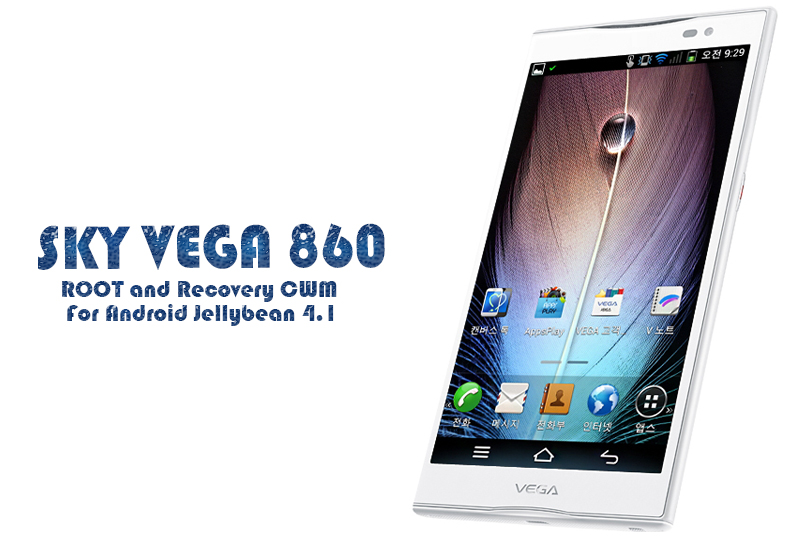
Sky Vega 860S,L,K Root And CWM Recovery For Jellybean 4.1.2 |Tested||Without PC|

Root And Recovery For Sky Vega IM-A860L,S,K For Jellybean
Just Follow These Step's For Rooting
1- Download Framaroot.Apk And Install it Into Phone
2- After Installing Framaroot.Apk Open it And Click On Last Gandalf Option
After Click on Gandalf Option Restart The Phone And After Restarting, Open Menu And Check SuperSu App If It Appear Mean Your Phone Is Rooted
Also Download Root Checker App From Play-Store And Check Root Access
After Rooting Install CWM Recovery
Download CWM Recovery Package For Sky 860L,S,K
In This recovery Package Two Files One 860.IMG And Second is Recovery.Apk
After Download Recovery Package Extract This Folder And Copy Both File IMG And APK Into Phone And Install Recovery.Apk
After Installing Recovery Apk Open it |When You Open Recovery Tool After Installing It Give Root Access Simply Click On Grant Option 
Now Click On  Flash Recovery Like Image
Now Click On Other From Storage
When You Click On Other From Storage Then File manager Open Find .IMG File And Click On it
Now Your Phone Successfully Installed CWM recovery Enjoy

|Android| How To Use Custom Recovery And How To Flash Custom Rom Via Custom Recovery

First Of All I Show You How To Reboot Mobile in Custom Recovery. After Installation Custom Recovery.
 One Question In Our Mind Now How To Run it ?
Don't Worry It Is Very Simple :)
After Installing Custom Recovery Install this |Rebooter.apk| Software
It Give You 3 Option
1-Shutdown
2-Restart
3-Reboot Recovery

After Installation Reooter.apk Open It And Click On |Reboot Recovery|
Your Phone Reboot in Custom Recovery :)
Download Here Rebooter.apk
|
Now Another Question Is How to Flash Custom Rom |Zip format| ?
Don't Worry It's Also Very Simple:)
Download Custom Rom And Copy In-to Phone Memory
Reboot Mobile In Custom Recovery
Note:Volume Up And Down Button Use For Go Up And Down And Power Button For Click
Main Page Of  Recovery
Now Click on |Wipe Data/factory reset|
Then Click On|Yes Delete All user Data|
Then Click On Go back
Then Click On |Wipe Cache Partition|
Then Click  On |yes Wipe Cache|
Click On Go Back
Now Go-to Advance Setting
Wipe Dalvik Cache
Yes Wipe Dalvik Cache
Wipe Battery Satuts
Yes Wipe battery Status
Go back On Main page 
Now Click On |Install Zip From Sdcard|
Then Click On |Choose Zip From Sdcard|
When you Click On Choose Zip From Sdcard Your File Manager Is Open
Find The Rom And Click On It
When you Click On Custom Rom.zip .Confirmation Message is appear Click On yes
When you Click On yes Your Custom Rom Flashing Is Start Now
Wait Just Few Minute Around About 5 Minute
When Flashing Is Complete Click On Go Back
  Again Click On Go back Now You Are On Main Page
Now Click on Reboot System Now
Congratess Your New Rom Now Start Phone Give 5 Minute On First Start-up
|I hope This Post Is Help Full For You|


Subscribe Us On Youtube

Subscribe Us On Youtube